What Is Node-Based Grading? A Simple, Friendly Guide for Film Enthusiasts
Curious about node-based grading? Learn what nodes are, how they work, and why DI colorists use them. Perfect for courses in Kochi & Kerala.
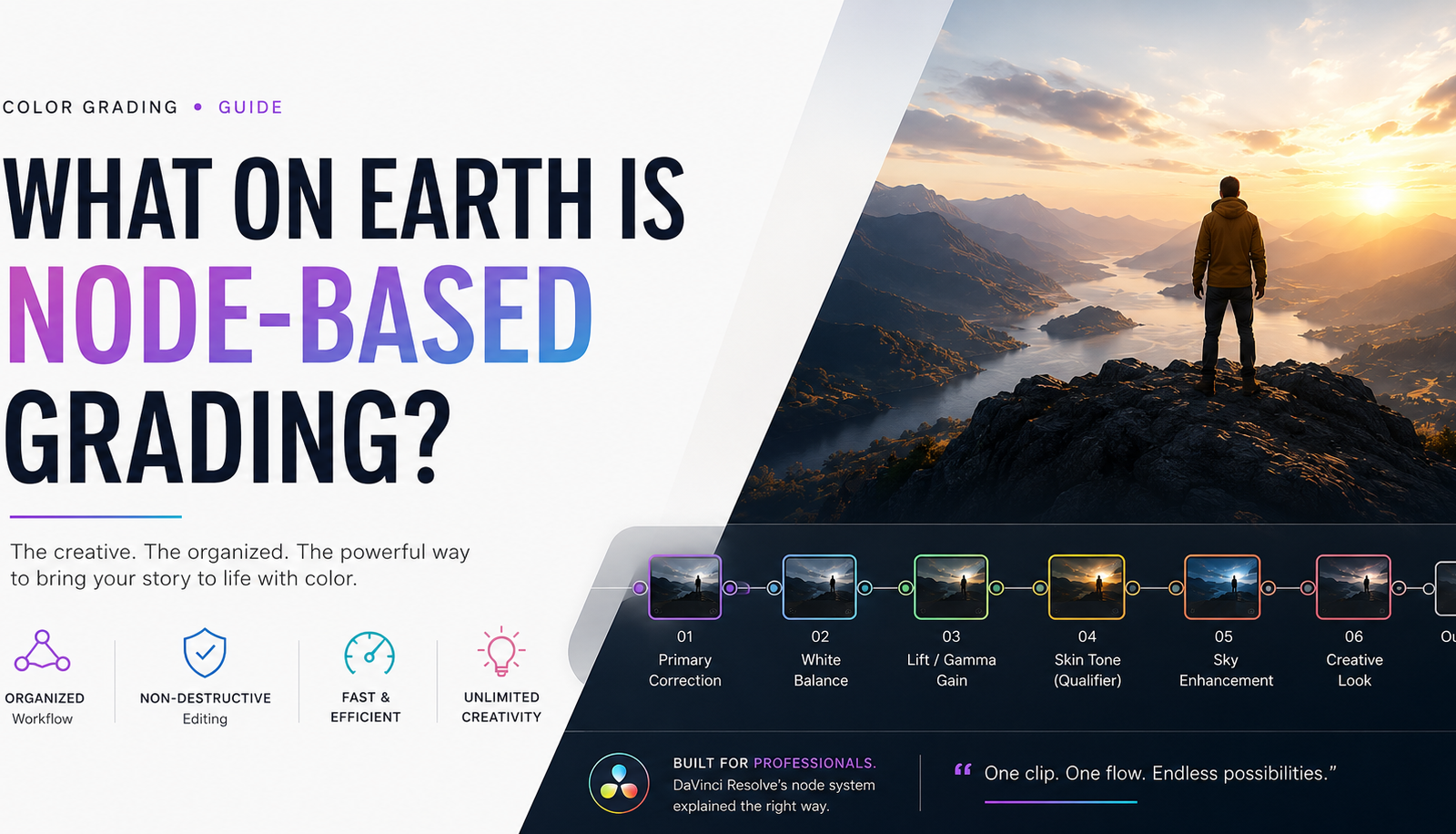
So, What on Earth Is Node-Based Grading?
Okay, let's be honest the first time you hear the phrase node-based grading, it sounds like something from a sci-fi movie, right? Like some secret language that only the cool kids in a dark editing room know about.
But here's the thing it's actually one of the most exciting, creative, and genuinely fun ways to color a film or video. And once you understand it, you'll wonder how anyone ever worked without it!
Node-based grading is a way of organizing your color corrections in a grading software (like DaVinci Resolve) where each "node" acts like its own little box of magic. Instead of applying all your color changes in one messy pile, you stack them neatly one node for this, another node for that. Clean, organized, and totally in your control.
Think of it like building with LEGO bricks. Each brick does one job. Together, they create something incredible.
Let's Talk About Nodes What Actually Are They?
A node is simply a processing block. Inside each node, you make one specific color change maybe you fix the brightness, maybe you tweak the skin tones, maybe you add a warm golden hue to the whole scene.
Each node connects to the next one, passing your image through a chain of color decisions one step at a time.
Here's a simple way to picture it:
Raw Footage → Node 1 (Fix Exposure) → Node 2 (Fix White Balance) → Node 3 (Creative Look) → Final Output
Simple, right? It's like a recipe each step adds a new layer of flavor until your dish (or in this case, your footage) is absolutely chef's kiss perfect.
Why Do Colorists Love Working With Nodes?
Oh, where do we even begin! There are so many reasons node-based grading has become the go-to method for professional colorists around the world, including talented DI colorists right here in Kerala.
1. Full Control, Zero Chaos
Without nodes, all your color adjustments sit on top of each other in one space. It gets messy fast. With nodes, everything has its own little home. You know exactly where each change lives, and you can go back and tweak just that one thing without disturbing anything else.
2. Non-Destructive Workflow
This is a big deal! Node-based grading lets you make changes without permanently ruining your footage. Want to undo just the skin tone fix from step 4? No problem go to that node and fix it. The rest of your grade stays untouched.
3. Speed and Efficiency
Once you get comfortable with nodes, you start working so much faster. You can copy nodes from one clip to another, save your favorite node setups for future projects, and build grades at lightning speed.
4. Limitless Creativity
You can go wild with nodes. Add a node just for the sky. Add a node just for the faces in the frame. Add a special node to make the shadows look cinematic and moody. The possibilities are genuinely endless and that's what makes it so joyful for creative people!
Types of Nodes You'll Come Across
When you start exploring color grading especially if you join a color grading course in Kerala you'll quickly discover that not all nodes are the same. Here are the main ones:
Serial Node
This is the most common type. Nodes connect in a straight line, one after the other. Each node gets the output from the one before it. Think of it as a straight train track.
Parallel Node
Here, multiple nodes run at the same time and their results are blended together. Great for mixing different color treatments without them cancelling each other out.
Layer Node
This one works like layers in Photoshop. The top layer blends into the bottom one. Super useful when you want to mix a stylized look with your base grade.
Outside Node
This node processes everything outside a mask or selection you've made. So if you've isolated the sky and adjusted it, the Outside Node lets you adjust everything that's not the sky. Clever, yes?
Each of these tools opens up a whole new world of creative possibilities and learning them properly is one of the most satisfying parts of any serious DI colorist course in Kochi.
Node-Based Grading vs. Layer-Based Grading
You might be wondering isn't this just like working with layers in Premiere Pro or Photoshop? Great question!
The short answer is: not quite.
Layer-based grading (like in Adobe Premiere or even older tools) stacks effects on top of each other in a visual timeline. It works, but it can get cluttered and hard to manage on bigger projects.
Node-based grading, on the other hand, gives you a flowchart-style visual map of your entire color pipeline. You can see exactly how your image travels through each correction step. It's more transparent, more organized, and far more powerful for professional work.
This is exactly why DaVinci Resolve the industry-standard professional grading software is built around nodes. And it's exactly why anyone serious about a color grading course in Kochi will spend a big chunk of their time learning the node system inside out.
A Real-World Example to Make It Click
Let's say you're grading a beautiful outdoor interview scene shot in bright afternoon light. Here's how you might set up your nodes:
Node 1 Primary Correction: Fix the overall exposure and white balance. Make the image look neutral and clean.
Node 2 Lift, Gamma, Gain: Fine-tune the shadows, midtones, and highlights separately. Add some depth.
Node 3 Qualifier + Skin Tone: Isolate the person's skin using a color qualifier. Gently warm it up and make it look healthy and glowing.
Node 4 Sky Enhancement: Isolate the sky in the background. Make it a richer, deeper blue.
Node 5 Creative Look: Add your final "look" maybe a warm, cinematic tone that ties everything together beautifully.
And just like that, in five clean, separate steps, you've taken a flat, ungraded clip and turned it into something that looks absolutely cinematic. That's the magic of node-based grading!
Where Can You Learn Node-Based Grading in Kerala?
Now that you're probably buzzing with excitement about nodes (welcome to the club, honestly!), you might be wondering where can I actually learn all of this properly?
If you're based in or around Kerala, you're in a really exciting spot right now. The film and content industry in Kerala is booming, and the demand for skilled colorists is growing fast.
Looking for a color grading course in Kochi or a DI colorist course in Kochi? There are professional training programmes designed to take you from complete beginner to job-ready colorist covering everything from node fundamentals to full-blown DI (Digital Intermediate) workflows.
A solid color grading course in Kerala won't just teach you how to push colors around on a screen. It'll teach you:
How to read an image and understand what it needs
The full node-based workflow in DaVinci Resolve
How to work with LUTs, masks, and qualifiers
How to match shots and maintain consistency across a film
The real-world workflow of a DI colorist in a professional post-production setup
This kind of hands-on training is what separates someone who knows about color grading from someone who can actually do it at a professional level.
Who Should Learn Node-Based Grading?
Great news this is for everyone who loves visual storytelling!
Videographers who want to elevate their own work
Editors looking to add color skills to their toolkit
Film students who want to be ready for the industry
YouTubers and content creators who want their videos to look stunning
Photographers curious about moving into video grading
Aspiring DI colorists who want to work on films, web series, and OTT content
Honestly? If you care about how images look and feel, node-based grading will open up a whole new world for you.
Quick Tips If You're Just Getting Started
Starting something new can feel a little wobbly, but here are some things that'll make your node-based grading journey so much smoother:
Start with serial nodes. Get comfortable with the straight-line node chain before you branch out into parallel and layer nodes.
Label your nodes. Seriously, label them. Future you will be so grateful. "Skin Tone Fix" is a hundred times better than "Node 5."
Grade on a calibrated monitor. What you see should accurately represent what the final output will look like. This matters more than most beginners realize.
Study reference images. Look at how your favorite films are graded. What's the mood? What colors dominate? Use that as inspiration.
Practice on varied footage. Grade a sunny outdoor scene, a moody night scene, a skin-heavy interview. Each type of footage teaches you something new.
FAQs About Node-Based Grading
Q: What software uses node-based grading? DaVinci Resolve is the most popular and widely used software for node-based color grading. It's the industry standard for professional film and TV work.
Q: Is node-based grading hard to learn? It has a bit of a learning curve at the beginning, but once the logic clicks, it becomes very intuitive. Most students in a structured color grading course pick up the basics within their first few sessions.
Q: Is node-based grading better than layer-based grading? For professional and complex projects, node-based grading offers more control, better organization, and a cleaner workflow. Most professional colorists strongly prefer it.
Q: Can I learn color grading online or do I need in-person training? Both options exist! However, for hands-on skills like DI coloring, in-person training especially from experienced professionals can make a big difference. Courses in Kochi offer access to proper grading setups and real-world mentorship.
Q: What is a DI colorist? A DI (Digital Intermediate) colorist is a professional who handles the final color grading of a film or video project in a post-production environment. They work with directors and cinematographers to achieve the final visual look of a production.
Q: How long does it take to become a professional color grader? With dedicated learning and practice, most people can develop foundational skills in a few months. Becoming highly proficient especially in complex DI workflows typically takes consistent practice over a longer period, ideally alongside real projects.
Q: What jobs can I get after a DI colorist course in Kochi? Graduates can find opportunities in film production houses, OTT content studios, advertising agencies, broadcast companies, and as freelance colorists for independent filmmakers.
Final Thoughts The Joy of Working With Nodes
Node-based grading is one of those skills that looks intimidating from the outside but feels absolutely wonderful once you're inside it. There's something deeply satisfying about watching a flat, lifeless piece of footage slowly transform into something cinematic and emotionally powerful all through the careful, intentional use of color.
Whether you're dreaming of grading the next big Malayalam film, working on a YouTube series, or building a career in post-production, learning node-based grading is one of the best investments you can make in yourself.
And if you're in Kerala especially around Kochi there's never been a better time to dive in. The industry is hungry for skilled colorists, and the learning resources around you are growing fast.
So go ahead. Embrace the nodes. Fall in love with color. And get ready to see the world in a whole new light.
Looking for a color grading course in Kochi or a DI colorist course in Kerala? Explore professional training programmes that will take your color skills to the next level!